> ## Documentation Index
> Fetch the complete documentation index at: https://docs-staging-feat-sdk-reference-docs.mintlify.site/llms.txt
> Use this file to discover all available pages before exploring further.
> Découvrez comment utiliser les variables pour accéder aux données utilisateur et les transformer dans Forms et Flows.
# Variables et fonctions utilitaires
Les variables vous permettent d’accéder aux données contenues dans Forms et Flows pour créer une logique métier personnalisée et des automatisations.
Voici quelques points de base à retenir sur l’utilisation des variables :
* Les variables sont entourées d’accolades `{{ variable }}`.
* Si une variable n’existe pas ou ne peut pas être résolue, elle a le même effet qu’une variable `undefined`.
* Vous pouvez utiliser l’opérateur de coalescence des valeurs nulles pour gérer les variables `null` ou `undefined`, par exemple :`{{fields.foo ?? fields.bar}}`.
Variables disponibles
Vous pouvez utiliser différents types de variables pour référencer et transformer les données que vous recueillez auprès de vos clients avec Forms et Flows.
| Variable | Syntaxe | Où | Description |
| - | - | - | - |
| Contexte | `{{context.*}}` | Forms / Flows | Référence les données de contexte de la transaction en cours |
| Champs de formulaire | `{{fields.*}}` | Forms / Flows | Référence les données de vos champs de formulaire et de vos champs masqués |
| Variables partagées | `{{vars.*}}` | Forms / Flows | Référence les données stockées dans des variables partagées |
| Sortie des actions de Flow | `{{actions.*}}` | Flows | Référence les données de la réponse de sortie des actions de Flow précédentes |
| Fonctions utilitaires | `{{functions.*}}` | Forms / Flows | Fonctions utilitaires pour transformer les données |
Variables de contexte
Forms et les flows héritent automatiquement des variables de contexte de la transaction en cours. Vous pouvez accéder aux variables de contexte suivantes :
* L’objet `user`, avec accès aux propriétés suivantes :
* `user.user_id`
* `user.username`
* `user.name`
* `user.given_name`
* `user.family_name`
* `user.nickname`
* `user.email`
* `user.email_verified`
* `user.phone_number`
* `user.phone_verified`
* `user.picture`
* `user.user_metadata`
* `user.app_metadata`
* `user.created_at`
* `user.updated_at`
* `user.last_password_reset`
* `user.identities`
* L’objet `organization`, avec accès aux propriétés suivantes :
* `organization.id`
* `organization.name`
* `organization.display_name`
* `organization.metadata`
* L’objet `client`, avec accès aux propriétés suivantes :
* `client.client_id`
* `client.name`
* L’objet `tenant`, avec accès à la propriété suivante :
* `tenant.name`
* L’objet `transaction`, avec accès aux propriétés suivantes :
* `transaction.state`
* `transaction.correlation_id`
* L’objet `custom_domain`, avec accès aux propriétés suivantes :
* `custom_domain.domain`
* `custom_domain.domain_metadata`
```json lines expandable theme={null}
{
"user": {
"user_id": "auth0|658409...",
"name": "ana@travel0.com",
"nickname": "ana",
"email": "ana@travel0.com",
"email_verified": true,
"picture": "https://s.gravatar.com/avatar/8eb1b522f6...",
"user_metadata": {},
"app_metadata": {},
"created_at": "2023-12-21T09:46:40.487Z",
"updated_at": "2024-05-07T10:44:26.271Z",
"last_password_reset": "2023-12-21T09:49:08.932Z",
"identities": [
{
"user_id": "6584...",
"isSocial": false,
"provider": "auth0",
"connection": "Username-Password-Authentication"
}
]
},
"client": {
"client_id": "xpeg5...",
"name": "My App"
},
"tenant": {
"name": "tenant-testing"
},
"transaction": {
"state": "hKFo2SBId2M0...",
"correlation_id": "txn_12345_xyz"
},
"custom_domain": {
"domain": "example.com",
"domain_metadata": {
"key": "value"
}
}
}
```
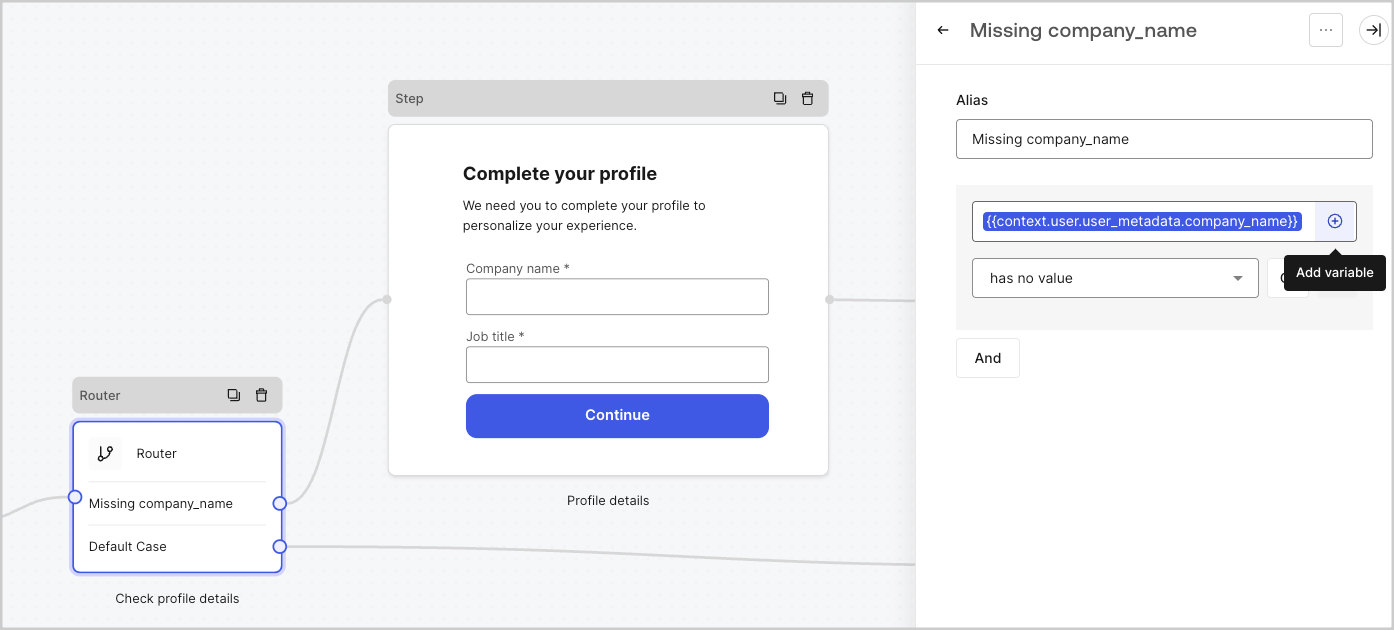
Par exemple : `{{context.user.user_id}}` correspond au `user_id` de l’objet `user`.
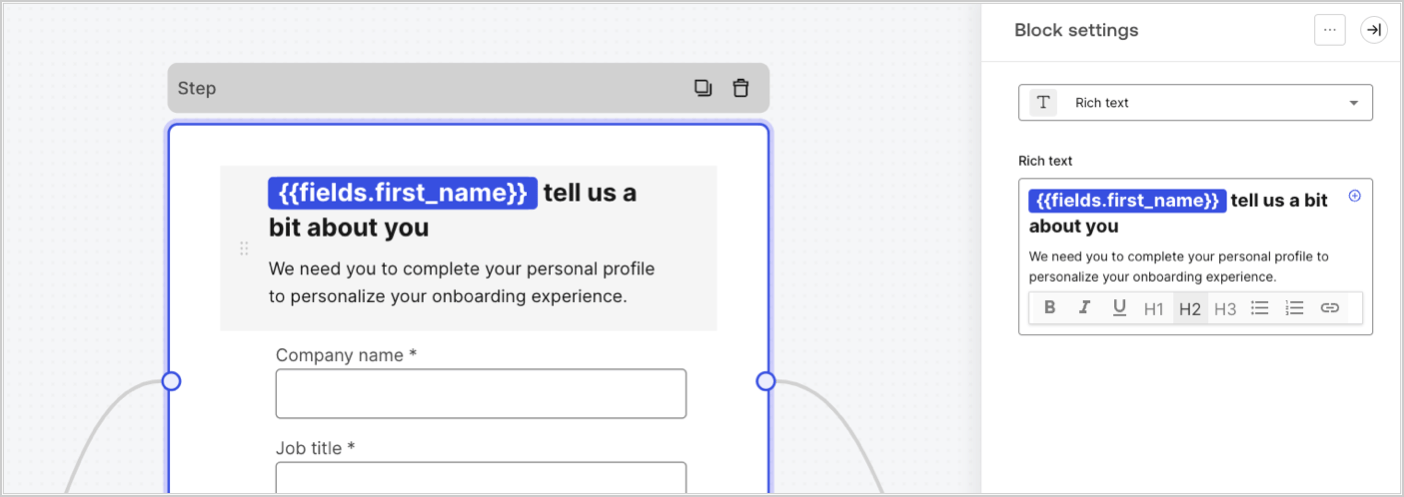
 Les variables de champ contiennent les données saisies par l’utilisateur dans les champs de saisie du formulaire, ainsi que les données des champs masqués. Les données associées à chaque champ varient selon le type de champ. Par exemple : `{{fields.first_name}}` fait référence à la valeur saisie dans un champ ayant l’ID `first_name`.
Variables de sortie des actions de Flow
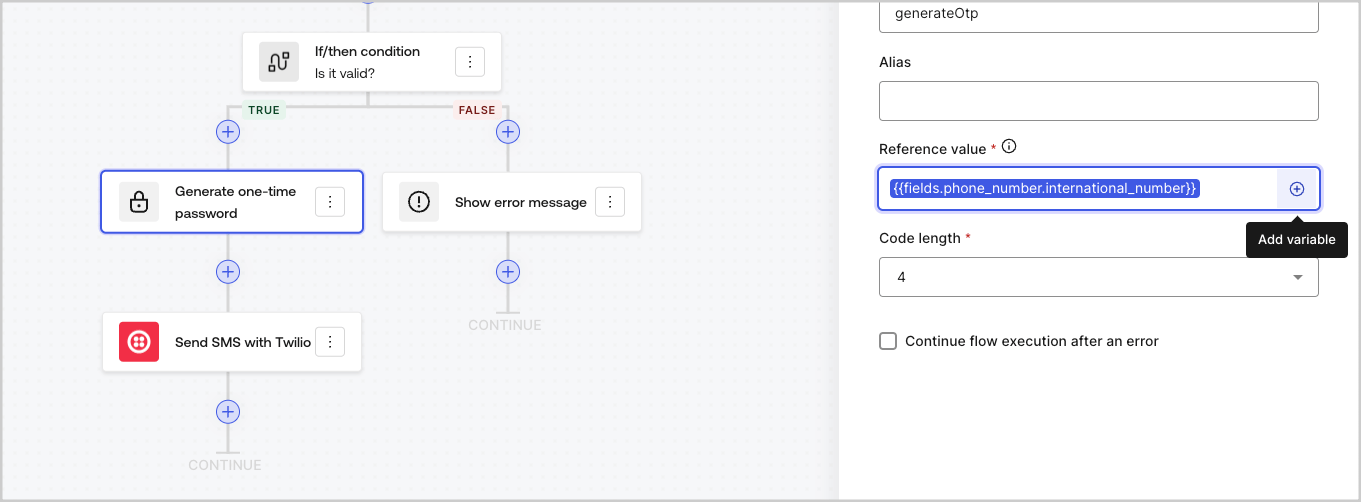
Lorsqu’une action de Flow est exécutée, elle génère une réponse sous forme d’objet de sortie qui peut être utilisée dans les actions suivantes. Par exemple : `{{actions.generate_otp.code}}` fait référence au code de sortie de l’action ayant l’ID `generate_otp`.

Variables partagées
Vous pouvez stocker des variables afin qu’elles soient partagées avec des flows ultérieurs ou même avec des composants de formulaire dans la même transaction. Les variables partagées sont éphémères et associées à un parcours de formulaire précis. Leurs valeurs ne sont pas accessibles à l’extérieur de ce parcours. Par exemple : `{{vars.external_id}}` fait référence à la valeur d’une variable partagée ayant l’ID `external_id`.
 Variables partagées :
* sont internes (côté serveur) et ne sont pas exposées au navigateur (côté client).
* peuvent être résolues et exposées au navigateur si vous faites référence à une variable partagée dans un composant de formulaire.
* peuvent contenir des renseignements sensibles; faites donc preuve de prudence lorsque vous accédez à une variable partagée afin d’éviter toute exposition inutile ou involontaire.
Variables partagées :
* sont internes (côté serveur) et ne sont pas exposées au navigateur (côté client).
* peuvent être résolues et exposées au navigateur si vous faites référence à une variable partagée dans un composant de formulaire.
* peuvent contenir des renseignements sensibles; faites donc preuve de prudence lorsque vous accédez à une variable partagée afin d’éviter toute exposition inutile ou involontaire.
Fonctions utilitaires
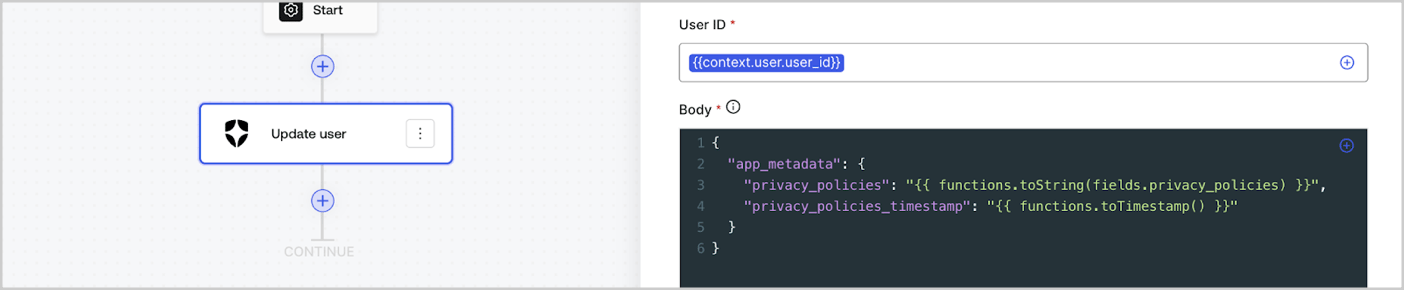
Les fonctions utilitaires vous permettent de transformer des données et d’effectuer des opérations simples. Par exemple : `{{functions.toString(fields.privacy_policies)}}` transforme la valeur du champ dont l’ID est `privacy_policies` à l’aide de la fonction `toString()`.
 Les fonctions utilitaires disponibles sont :
| Fonction | Description | Exemple |
| - | - | - |
| `toArray(value)` | Convertit la valeur en tableau. | `{{ functions.toArray('abc') }} // ['abc']` |
| `toBoolean(value)` | Convertit la valeur en valeur booléenne. | `{{ functions.toBoolean(1) }} // vrai<br /><br />\{\{ functions.toBoolean(0) }} // faux` |
| `length(value)` | Retourne la longueur de la valeur du paramètre. | `{{ functions.length('auth0') }} // 5` |
| `mask(value)` | Masque une valeur afin d’éviter qu’elle ne soit affichée dans Executions. | `{{ functions.mask('my_awesome_secret') }} // ███` |
| `toNumber(value)` | Convertit la valeur en nombre. | `{{ functions.toNumber('123') }} // 123` |
| `random(min, max, [boolean])` | Renvoie un nombre aléatoire compris entre les valeurs min et max, inclusivement. | `{{ functions.random(0, 6) }} // 4 <br /><br />\{\{ functions.random(0, 6, true) }} // 3.8523497...` |
| `slice(value, start, end)` | Renvoie une portion d’un tableau ou d’une chaîne de caractères comprise entre les indices de début et de fin. | `{{ functions.slice( 'example', 3, 5) }} // 'mp'` |
| `toString(value)` | Convertit la valeur en chaîne de caractères. | `{{ functions.toString(123) }} // '123'` |
| `substring(value, start, end)` | Retourne la partie d’une valeur comprise entre l’index de début et l’index de fin. Pour en savoir plus, consultez les [différences entre les fonctions slice et substring](https://developer.mozilla.org/en-US/docs/Web/JavaScript/Reference/Global_Objects/String/substring#differences_between_substring_and_slice) | `{{ functions.substring( 'example’', 3, 5) }} // 'mp'` |
| `toTimestamp()` | Renvoie l’horodatage UNIX actuel. | `{{ functions.toTimestamp() }} // 1628761483` |
| `toTimestamp(date)` | Retourne la date fournie au format UNIX. | `{{ functions.toTimestamp('2021-04-30T10:02:50.876Z') }} // 1619776970` |
| `toTimestamp(date)` | Retourne la date fournie au format UNIX. | `{{ functions.toTimestamp('2021-04-30T10:02:50.876Z') }} // 1619776970` |
| `toLowerCase(value)` | Retourne une nouvelle chaîne en minuscules. | `{{ functions.toLowerCase('JohnDoe 1234') }} // johndoe 1234` |
| `toUpperCase(value)` | Retourne une nouvelle chaîne en majuscules. | `{{ functions.toUpperCase('JohnDoe 1234') }} // JOHNDOE 1234` |
| `replaceAll(value, string, replacement)` | Renvoie une nouvelle chaîne dans laquelle toutes les occurrences d’un motif sont remplacées par une chaîne de remplacement. | `{{ functions.replaceAll('2021-04-30', '-', '/') }} // 2021/04/30` |
| `replace(value, string, replacement)` | Renvoie une nouvelle chaîne dans laquelle toutes les occurrences d’un motif sont remplacées par une chaîne de remplacement. Si le motif est une chaîne, seule la première occurrence sera remplacée. | `{{ functions.replace('2021-04-30', '-', '/') }} // 2021/04-30` |
| `split(value, separator, limit?)` | Renvoie une liste ordonnée de sous-chaînes découpées selon le séparateur. | `{{ functions.split('2021-04-30', '-') }} // ['2021', '04', '30']` |
| `now()` | Renvoie la date actuelle au format ISO 8601. | `{{ functions.now() }} // 2021-04-30T10:31:28.576Z` |
| `includes(collection, item, fromIndex?)` | Indique si un tableau contient une certaine valeur parmi ses éléments. | `{{ functions.includes(['auth0', 'identity', 'authentication'], 'identity') }} // true` |
| `indexOf(collection, item, fromIndex?)` | Renvoie le premier indice auquel un élément donné peut être trouvé dans le tableau, ou -1 s’il n’y figure pas. | `{{ functions.indexOf(['auth0', 'identity', 'authentication'], 'identity') }} // 1` |
| `merge(base, value)` | Renvoie un tableau ou un objet fusionné, ou concatène une chaîne selon le type de données de base. | `{{ functions.merge(['auth0', 'identity'], ['authentication']) }} // ['auth0', 'identity', 'authentication']` |
| `md5(value)` | Renvoie une valeur hachée avec MD5. | `{{ functions.md5('auth0') }} // 7bbb597...` |
| `sha1(value)` | Renvoie une valeur hachée avec SHA1. | `{{ functions.sha1('auth0') }} // b4ec5339...` |
| `sha256(value)` | Renvoie une valeur hachée avec SHA256. | `{{ functions.sha256('auth0') }} // d9082bdc...` |
| `sha512(value)` | Renvoie une valeur hachée avec SHA512. | `{{ functions.sha512('auth0') }} // c0d588069d...` |
| `uuid()` | Renvoie un UUID v4 aléatoire. | `{{ functions.uuid() }} // 36b8f84d-df4e-4d49-b662-bcde71a8764` |
Les fonctions utilitaires disponibles sont :
| Fonction | Description | Exemple |
| - | - | - |
| `toArray(value)` | Convertit la valeur en tableau. | `{{ functions.toArray('abc') }} // ['abc']` |
| `toBoolean(value)` | Convertit la valeur en valeur booléenne. | `{{ functions.toBoolean(1) }} // vrai<br /><br />\{\{ functions.toBoolean(0) }} // faux` |
| `length(value)` | Retourne la longueur de la valeur du paramètre. | `{{ functions.length('auth0') }} // 5` |
| `mask(value)` | Masque une valeur afin d’éviter qu’elle ne soit affichée dans Executions. | `{{ functions.mask('my_awesome_secret') }} // ███` |
| `toNumber(value)` | Convertit la valeur en nombre. | `{{ functions.toNumber('123') }} // 123` |
| `random(min, max, [boolean])` | Renvoie un nombre aléatoire compris entre les valeurs min et max, inclusivement. | `{{ functions.random(0, 6) }} // 4 <br /><br />\{\{ functions.random(0, 6, true) }} // 3.8523497...` |
| `slice(value, start, end)` | Renvoie une portion d’un tableau ou d’une chaîne de caractères comprise entre les indices de début et de fin. | `{{ functions.slice( 'example', 3, 5) }} // 'mp'` |
| `toString(value)` | Convertit la valeur en chaîne de caractères. | `{{ functions.toString(123) }} // '123'` |
| `substring(value, start, end)` | Retourne la partie d’une valeur comprise entre l’index de début et l’index de fin. Pour en savoir plus, consultez les [différences entre les fonctions slice et substring](https://developer.mozilla.org/en-US/docs/Web/JavaScript/Reference/Global_Objects/String/substring#differences_between_substring_and_slice) | `{{ functions.substring( 'example’', 3, 5) }} // 'mp'` |
| `toTimestamp()` | Renvoie l’horodatage UNIX actuel. | `{{ functions.toTimestamp() }} // 1628761483` |
| `toTimestamp(date)` | Retourne la date fournie au format UNIX. | `{{ functions.toTimestamp('2021-04-30T10:02:50.876Z') }} // 1619776970` |
| `toTimestamp(date)` | Retourne la date fournie au format UNIX. | `{{ functions.toTimestamp('2021-04-30T10:02:50.876Z') }} // 1619776970` |
| `toLowerCase(value)` | Retourne une nouvelle chaîne en minuscules. | `{{ functions.toLowerCase('JohnDoe 1234') }} // johndoe 1234` |
| `toUpperCase(value)` | Retourne une nouvelle chaîne en majuscules. | `{{ functions.toUpperCase('JohnDoe 1234') }} // JOHNDOE 1234` |
| `replaceAll(value, string, replacement)` | Renvoie une nouvelle chaîne dans laquelle toutes les occurrences d’un motif sont remplacées par une chaîne de remplacement. | `{{ functions.replaceAll('2021-04-30', '-', '/') }} // 2021/04/30` |
| `replace(value, string, replacement)` | Renvoie une nouvelle chaîne dans laquelle toutes les occurrences d’un motif sont remplacées par une chaîne de remplacement. Si le motif est une chaîne, seule la première occurrence sera remplacée. | `{{ functions.replace('2021-04-30', '-', '/') }} // 2021/04-30` |
| `split(value, separator, limit?)` | Renvoie une liste ordonnée de sous-chaînes découpées selon le séparateur. | `{{ functions.split('2021-04-30', '-') }} // ['2021', '04', '30']` |
| `now()` | Renvoie la date actuelle au format ISO 8601. | `{{ functions.now() }} // 2021-04-30T10:31:28.576Z` |
| `includes(collection, item, fromIndex?)` | Indique si un tableau contient une certaine valeur parmi ses éléments. | `{{ functions.includes(['auth0', 'identity', 'authentication'], 'identity') }} // true` |
| `indexOf(collection, item, fromIndex?)` | Renvoie le premier indice auquel un élément donné peut être trouvé dans le tableau, ou -1 s’il n’y figure pas. | `{{ functions.indexOf(['auth0', 'identity', 'authentication'], 'identity') }} // 1` |
| `merge(base, value)` | Renvoie un tableau ou un objet fusionné, ou concatène une chaîne selon le type de données de base. | `{{ functions.merge(['auth0', 'identity'], ['authentication']) }} // ['auth0', 'identity', 'authentication']` |
| `md5(value)` | Renvoie une valeur hachée avec MD5. | `{{ functions.md5('auth0') }} // 7bbb597...` |
| `sha1(value)` | Renvoie une valeur hachée avec SHA1. | `{{ functions.sha1('auth0') }} // b4ec5339...` |
| `sha256(value)` | Renvoie une valeur hachée avec SHA256. | `{{ functions.sha256('auth0') }} // d9082bdc...` |
| `sha512(value)` | Renvoie une valeur hachée avec SHA512. | `{{ functions.sha512('auth0') }} // c0d588069d...` |
| `uuid()` | Renvoie un UUID v4 aléatoire. | `{{ functions.uuid() }} // 36b8f84d-df4e-4d49-b662-bcde71a8764` |
Bonnes pratiques pour les variables
Utilisez des IDs parlants
Lorsque vous ajoutez un champ de Form ou une action de Flow, l’ID est généré automatiquement.
Modifiez l’ID pour lui donner une valeur plus descriptive afin de pouvoir identifier l’information qu’il contient. Par exemple, si vous créez un champ de Form qui stocke le prénom de l’utilisateur, remplacez l’ID par `first_name`.
Faites preuve de prudence lorsque vous mettez à jour des IDs existants
Si une variable est déjà utilisée et que vous devez modifier l’ID, repérez les endroits où vous y avez fait référence et mettez l’ID à jour en conséquence afin d’éviter les valeurs non définies ou vides.
Vérifier les exécutions du Flow
Si vous voyez une valeur de variable inattendue, utilisez la vue [**Executions**](/docs/fr-ca/customize/forms/flows/flow-execution-and-debugger) pour diagnostiquer le problème lié à la variable.
Le menu de saisie semi-automatique vous aide à trouver et à référencer correctement les variables existantes.