> ## Documentation Index
> Fetch the complete documentation index at: https://docs-staging-feat-sdk-reference-docs.mintlify.site/llms.txt
> Use this file to discover all available pages before exploring further.

> Découvrez comment configurer un formulaire de mise à jour de politique à l’aide de Forms for Actions afin que les utilisateurs puissent examiner et accepter de nouvelles conditions d’utilisation ou des mises à jour de consentement.

# Cas d’utilisation : Configurer un formulaire de mise à jour de politique à l’aide de Forms

<Card title="Avant de commencer">
  1. Créez une [application Machine-to-Machine](/docs/fr-ca/get-started/auth0-overview/create-applications/machine-to-machine-apps) avec les scopes suivants activés :

  * `read:users`
  * `update:users`
  * `create:users`
  * `read:users_app_metadata`
  * `update:users_app_metadata`
  * `create:users_app_metadata`

  2. Ajoutez une [connexion Vault](/docs/fr-ca/customize/forms/vault) à l’aide des identifiants de l’application M2M.
</Card>

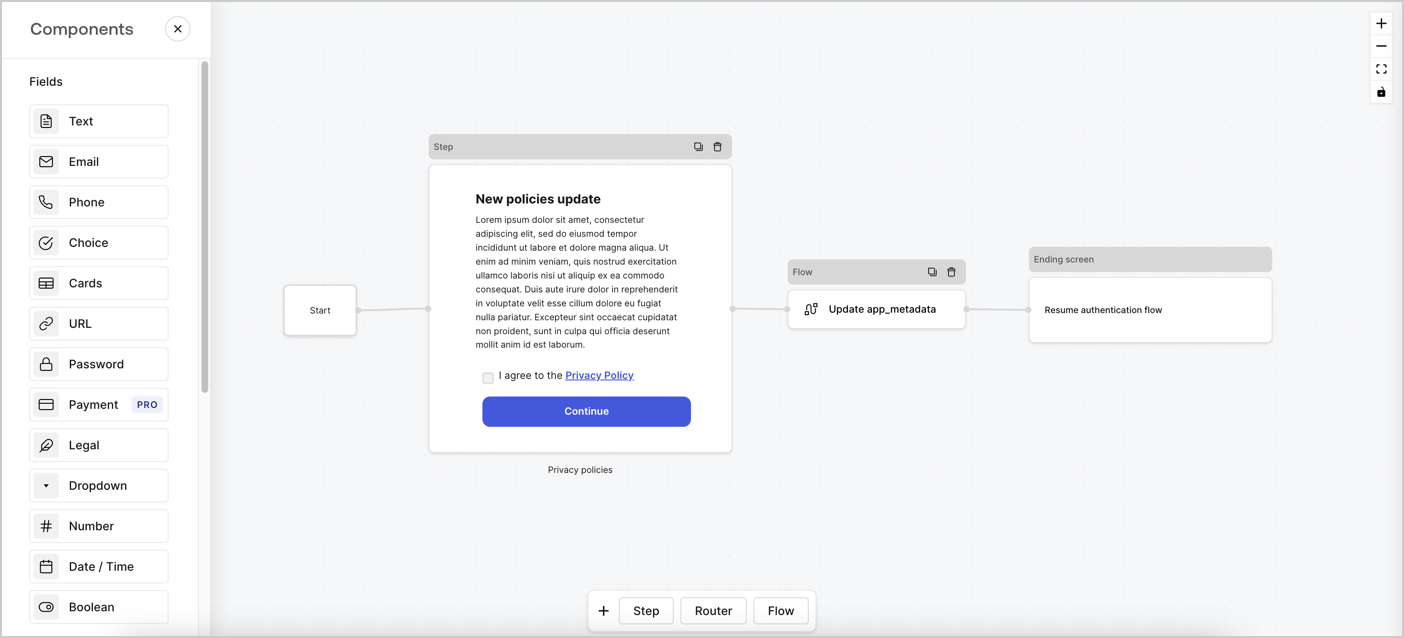
Forms for Actions vous permet de créer des flux personnalisés liés aux politiques de confidentialité et d’enregistrer le consentement dans l’objet `app_metadata`.
<Frame>
  <img src="https://mintcdn.com/docs-staging-feat-sdk-reference-docs/7XeQ3Zd4LUFArOyz/docs/images/cdy7uua7fh8z/6i68dMvHDTijfRmSgN1x8Q/ad900e7d4c0fb34645921435472b8684/privavy-policy-form.png?fit=max&auto=format&n=7XeQ3Zd4LUFArOyz&q=85&s=7760791bc350cf89980098daf426a7d6" alt="Dashboard > Actions > Forms > Cas d’utilisation de politique de confidentialité" data-og-width="1404" width="1404" data-og-height="638" height="638" data-path="docs/images/cdy7uua7fh8z/6i68dMvHDTijfRmSgN1x8Q/ad900e7d4c0fb34645921435472b8684/privavy-policy-form.png" data-optimize="true" data-opv="3" srcset="https://mintcdn.com/docs-staging-feat-sdk-reference-docs/7XeQ3Zd4LUFArOyz/docs/images/cdy7uua7fh8z/6i68dMvHDTijfRmSgN1x8Q/ad900e7d4c0fb34645921435472b8684/privavy-policy-form.png?w=280&fit=max&auto=format&n=7XeQ3Zd4LUFArOyz&q=85&s=f7b00117424407fd5d1af3578e0dee7d 280w, https://mintcdn.com/docs-staging-feat-sdk-reference-docs/7XeQ3Zd4LUFArOyz/docs/images/cdy7uua7fh8z/6i68dMvHDTijfRmSgN1x8Q/ad900e7d4c0fb34645921435472b8684/privavy-policy-form.png?w=560&fit=max&auto=format&n=7XeQ3Zd4LUFArOyz&q=85&s=70804c2b6c03af9f731ea8bc6093aebd 560w, https://mintcdn.com/docs-staging-feat-sdk-reference-docs/7XeQ3Zd4LUFArOyz/docs/images/cdy7uua7fh8z/6i68dMvHDTijfRmSgN1x8Q/ad900e7d4c0fb34645921435472b8684/privavy-policy-form.png?w=840&fit=max&auto=format&n=7XeQ3Zd4LUFArOyz&q=85&s=d0dadb10ae5e65046b73c3f16d4ac0a2 840w, https://mintcdn.com/docs-staging-feat-sdk-reference-docs/7XeQ3Zd4LUFArOyz/docs/images/cdy7uua7fh8z/6i68dMvHDTijfRmSgN1x8Q/ad900e7d4c0fb34645921435472b8684/privavy-policy-form.png?w=1100&fit=max&auto=format&n=7XeQ3Zd4LUFArOyz&q=85&s=e5b6551598cfbada16a4285e4ff682ce 1100w, https://mintcdn.com/docs-staging-feat-sdk-reference-docs/7XeQ3Zd4LUFArOyz/docs/images/cdy7uua7fh8z/6i68dMvHDTijfRmSgN1x8Q/ad900e7d4c0fb34645921435472b8684/privavy-policy-form.png?w=1650&fit=max&auto=format&n=7XeQ3Zd4LUFArOyz&q=85&s=5f5a9c0b1885530930559d1389088759 1650w, https://mintcdn.com/docs-staging-feat-sdk-reference-docs/7XeQ3Zd4LUFArOyz/docs/images/cdy7uua7fh8z/6i68dMvHDTijfRmSgN1x8Q/ad900e7d4c0fb34645921435472b8684/privavy-policy-form.png?w=2500&fit=max&auto=format&n=7XeQ3Zd4LUFArOyz&q=85&s=4a68169bac2b43f41206e2e0c7d6ad5e 2500w" />
</Frame>

Les sections ci-dessous expliquent comment créer un formulaire de mise à jour de politique à l’aide de nœuds et de flux, ainsi que les étapes pour ajouter votre formulaire à une Action [Post Login](/docs/fr-ca/customize/actions/explore-triggers/signup-and-login-triggers/login-trigger).

<h2 id="create-a-form-from-scratch">
  Créer un formulaire à partir de zéro
</h2>

Suivez ces étapes pour créer un formulaire afin de recueillir des informations :

1. Ouvrez l’éditeur de formulaires en sélectionnant **Auth0 Dashboard > Actions > Forms.**
2. Sélectionnez **Create Form** > **Start from scratch**.

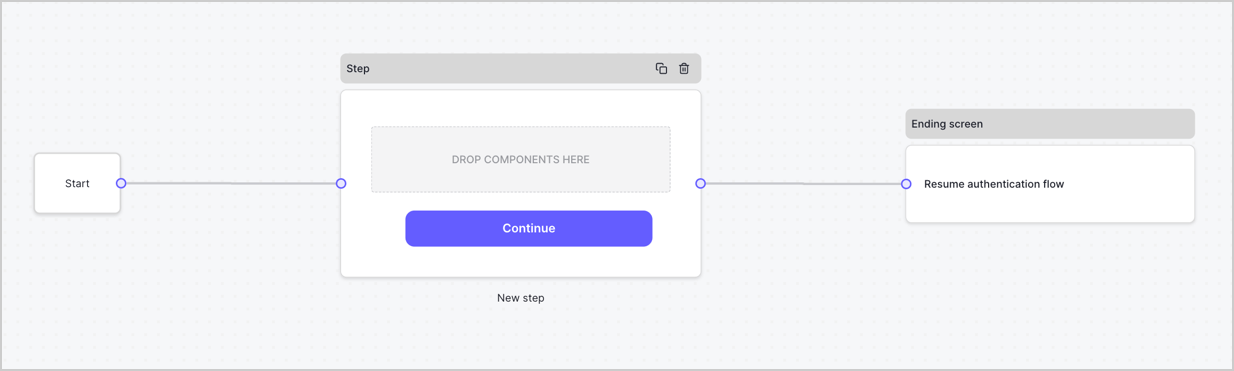
Par défaut, un nouveau formulaire contient un nœud Start, un nœud Step et un nœud Ending screen.
<Frame>
  <img src="https://mintcdn.com/docs-staging-feat-sdk-reference-docs/OMbaL5tGpZJgvr5N/docs/images/cdy7uua7fh8z/2TZ9jSjgEcARFpULI6hz4R/a4319a1bd482f2ee5cc23100fdb2f42c/New-form-Forms-for-action-use-case.png?fit=max&auto=format&n=OMbaL5tGpZJgvr5N&q=85&s=7930a5f9ae10fa47d7561081d69a69b7" alt="Dashboard > Forms > Use Cases > Form" data-og-width="1234" width="1234" data-og-height="371" height="371" data-path="docs/images/cdy7uua7fh8z/2TZ9jSjgEcARFpULI6hz4R/a4319a1bd482f2ee5cc23100fdb2f42c/New-form-Forms-for-action-use-case.png" data-optimize="true" data-opv="3" srcset="https://mintcdn.com/docs-staging-feat-sdk-reference-docs/OMbaL5tGpZJgvr5N/docs/images/cdy7uua7fh8z/2TZ9jSjgEcARFpULI6hz4R/a4319a1bd482f2ee5cc23100fdb2f42c/New-form-Forms-for-action-use-case.png?w=280&fit=max&auto=format&n=OMbaL5tGpZJgvr5N&q=85&s=f0d31d20b283a49a00612fbbf6c552ce 280w, https://mintcdn.com/docs-staging-feat-sdk-reference-docs/OMbaL5tGpZJgvr5N/docs/images/cdy7uua7fh8z/2TZ9jSjgEcARFpULI6hz4R/a4319a1bd482f2ee5cc23100fdb2f42c/New-form-Forms-for-action-use-case.png?w=560&fit=max&auto=format&n=OMbaL5tGpZJgvr5N&q=85&s=0602416a7aefdef82483407724d97ca1 560w, https://mintcdn.com/docs-staging-feat-sdk-reference-docs/OMbaL5tGpZJgvr5N/docs/images/cdy7uua7fh8z/2TZ9jSjgEcARFpULI6hz4R/a4319a1bd482f2ee5cc23100fdb2f42c/New-form-Forms-for-action-use-case.png?w=840&fit=max&auto=format&n=OMbaL5tGpZJgvr5N&q=85&s=12b6c18920dbda388369b2da8fb5e791 840w, https://mintcdn.com/docs-staging-feat-sdk-reference-docs/OMbaL5tGpZJgvr5N/docs/images/cdy7uua7fh8z/2TZ9jSjgEcARFpULI6hz4R/a4319a1bd482f2ee5cc23100fdb2f42c/New-form-Forms-for-action-use-case.png?w=1100&fit=max&auto=format&n=OMbaL5tGpZJgvr5N&q=85&s=56c65a1edd2830d0a5c6da1b56c925dd 1100w, https://mintcdn.com/docs-staging-feat-sdk-reference-docs/OMbaL5tGpZJgvr5N/docs/images/cdy7uua7fh8z/2TZ9jSjgEcARFpULI6hz4R/a4319a1bd482f2ee5cc23100fdb2f42c/New-form-Forms-for-action-use-case.png?w=1650&fit=max&auto=format&n=OMbaL5tGpZJgvr5N&q=85&s=e3351859398f5d778530eb8420ded8dd 1650w, https://mintcdn.com/docs-staging-feat-sdk-reference-docs/OMbaL5tGpZJgvr5N/docs/images/cdy7uua7fh8z/2TZ9jSjgEcARFpULI6hz4R/a4319a1bd482f2ee5cc23100fdb2f42c/New-form-Forms-for-action-use-case.png?w=2500&fit=max&auto=format&n=OMbaL5tGpZJgvr5N&q=85&s=59ca8d687803a97c1f68bdcfad3ceaef 2500w" />
</Frame>

<h3 id="configure-the-step-node">
  Configurer le nœud Step
</h3>

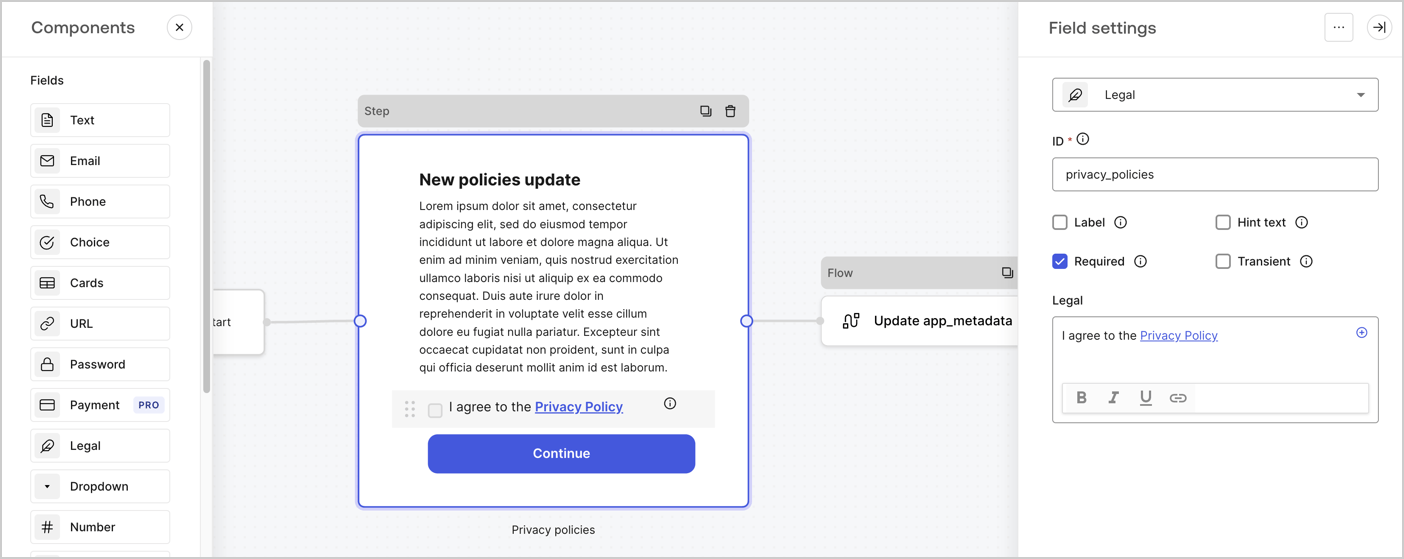
Le nœud Step est l’interface graphique visible par les utilisateurs. Ajoutez des [champs](/docs/fr-ca/customize/forms/nodes-and-components) au nœud Step pour recueillir la nouvelle valeur d’acceptation en suivant ces étapes :

1. Faites glisser un champ **Texte enrichi** du **menu Composants** vers le nœud **Step**.

   * **Texte enrichi** : Saisissez une description des mises à jour apportées à votre politique de confidentialité.
   * Sélectionnez **Enregistrer**.
2. Faites glisser un champ **Juridique** vers le nœud **Step**.

   * **ID** : Saisissez `privacy_policies`.
   * **Obligatoire** : Cochez la case.
   * **Juridique** : Saisissez `J’accepte la politique de confidentialité`.
   * Sélectionnez **Enregistrer**.
3. Sélectionnez **Publier** pour enregistrer.
<Frame>
  <img src="https://mintcdn.com/docs-staging-feat-sdk-reference-docs/VaWHC_KPGgUmZpWE/docs/images/cdy7uua7fh8z/59zFFjQjAnjogkc2QGIqqJ/0ad66b1b636544122aa4e65968b76c2c/privacy-policy-step-node.png?fit=max&auto=format&n=VaWHC_KPGgUmZpWE&q=85&s=95f143a60fd4d9d50db8787898f64919" alt="Dashboard > Actions > Forms > Cas d’utilisation du nœud Step de la politique de confidentialité" data-og-width="1404" width="1404" data-og-height="559" height="559" data-path="docs/images/cdy7uua7fh8z/59zFFjQjAnjogkc2QGIqqJ/0ad66b1b636544122aa4e65968b76c2c/privacy-policy-step-node.png" data-optimize="true" data-opv="3" srcset="https://mintcdn.com/docs-staging-feat-sdk-reference-docs/VaWHC_KPGgUmZpWE/docs/images/cdy7uua7fh8z/59zFFjQjAnjogkc2QGIqqJ/0ad66b1b636544122aa4e65968b76c2c/privacy-policy-step-node.png?w=280&fit=max&auto=format&n=VaWHC_KPGgUmZpWE&q=85&s=ead416e31b6476c5c5a98d686d1ee7ae 280w, https://mintcdn.com/docs-staging-feat-sdk-reference-docs/VaWHC_KPGgUmZpWE/docs/images/cdy7uua7fh8z/59zFFjQjAnjogkc2QGIqqJ/0ad66b1b636544122aa4e65968b76c2c/privacy-policy-step-node.png?w=560&fit=max&auto=format&n=VaWHC_KPGgUmZpWE&q=85&s=17eb1d25ca397a7e252914728b4065fd 560w, https://mintcdn.com/docs-staging-feat-sdk-reference-docs/VaWHC_KPGgUmZpWE/docs/images/cdy7uua7fh8z/59zFFjQjAnjogkc2QGIqqJ/0ad66b1b636544122aa4e65968b76c2c/privacy-policy-step-node.png?w=840&fit=max&auto=format&n=VaWHC_KPGgUmZpWE&q=85&s=0f4d0b95e1b25acf7c967ccb2f8a5f65 840w, https://mintcdn.com/docs-staging-feat-sdk-reference-docs/VaWHC_KPGgUmZpWE/docs/images/cdy7uua7fh8z/59zFFjQjAnjogkc2QGIqqJ/0ad66b1b636544122aa4e65968b76c2c/privacy-policy-step-node.png?w=1100&fit=max&auto=format&n=VaWHC_KPGgUmZpWE&q=85&s=1fc5546640e6c6cb27def25a6b1e271a 1100w, https://mintcdn.com/docs-staging-feat-sdk-reference-docs/VaWHC_KPGgUmZpWE/docs/images/cdy7uua7fh8z/59zFFjQjAnjogkc2QGIqqJ/0ad66b1b636544122aa4e65968b76c2c/privacy-policy-step-node.png?w=1650&fit=max&auto=format&n=VaWHC_KPGgUmZpWE&q=85&s=54b1448b2e675dbdac2b8a9a672e8276 1650w, https://mintcdn.com/docs-staging-feat-sdk-reference-docs/VaWHC_KPGgUmZpWE/docs/images/cdy7uua7fh8z/59zFFjQjAnjogkc2QGIqqJ/0ad66b1b636544122aa4e65968b76c2c/privacy-policy-step-node.png?w=2500&fit=max&auto=format&n=VaWHC_KPGgUmZpWE&q=85&s=7f35fc33a32156b0808d8e4e7659c5b2 2500w" />
</Frame>

<h3 id="configure-the-flow-node">
  Configurer le nœud **Flow**
</h3>

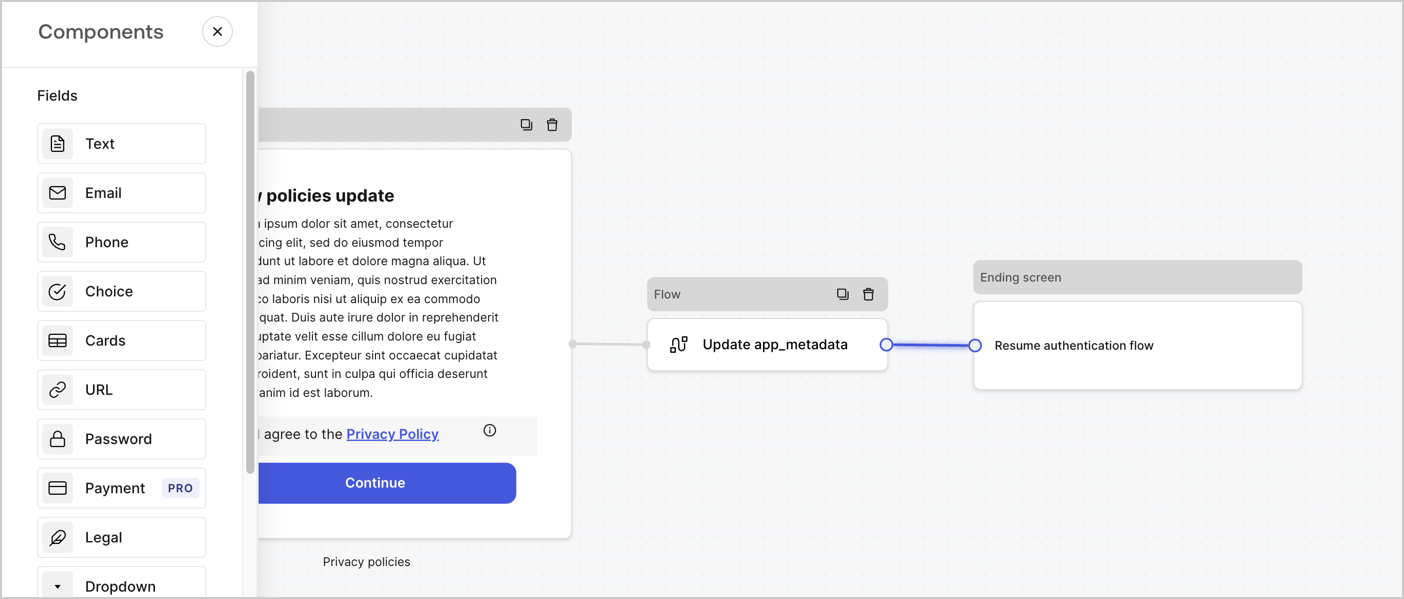
Ajoutez un nœud **Flow** après le nœud **Step** pour mettre à jour `app_metadata` et reprendre le flux d’authentification en suivant les étapes ci-dessous :

1. Sélectionnez **Flow** au bas de l’éditeur de formulaires.
2. Supprimez le lien existant entre les nœuds **Step** et **Ending Screen**.
3. Sélectionnez le nouveau **Flow** > **Click to add a flow** > **Create a new flow.**

   * Entrez `Update app_metadata` dans le champ **Name**.
   * Sélectionnez **Create**.
   * Sélectionnez **Save**.
4. Reliez le nœud **Flow** aux nœuds **Step** et **Ending Screen**, comme illustré ci-dessous.
5. Sélectionnez **Publish** pour enregistrer.
<Frame>
  <img src="https://mintcdn.com/docs-staging-feat-sdk-reference-docs/7XeQ3Zd4LUFArOyz/docs/images/cdy7uua7fh8z/6YIkzm7SrpM9LW76AXuRzh/353c518fe82bbaa440836da1d83596d6/link-policies.png?fit=max&auto=format&n=7XeQ3Zd4LUFArOyz&q=85&s=12a5281673914d23f817f34096f989f8" alt="Dashboard > Actions > Forms > Form" data-og-width="1404" width="1404" data-og-height="599" height="599" data-path="docs/images/cdy7uua7fh8z/6YIkzm7SrpM9LW76AXuRzh/353c518fe82bbaa440836da1d83596d6/link-policies.png" data-optimize="true" data-opv="3" srcset="https://mintcdn.com/docs-staging-feat-sdk-reference-docs/7XeQ3Zd4LUFArOyz/docs/images/cdy7uua7fh8z/6YIkzm7SrpM9LW76AXuRzh/353c518fe82bbaa440836da1d83596d6/link-policies.png?w=280&fit=max&auto=format&n=7XeQ3Zd4LUFArOyz&q=85&s=07d6ec5d2f7e2f36ce5b70b3f589def9 280w, https://mintcdn.com/docs-staging-feat-sdk-reference-docs/7XeQ3Zd4LUFArOyz/docs/images/cdy7uua7fh8z/6YIkzm7SrpM9LW76AXuRzh/353c518fe82bbaa440836da1d83596d6/link-policies.png?w=560&fit=max&auto=format&n=7XeQ3Zd4LUFArOyz&q=85&s=9213e0cd9d310cde713dea0e1b0a57d9 560w, https://mintcdn.com/docs-staging-feat-sdk-reference-docs/7XeQ3Zd4LUFArOyz/docs/images/cdy7uua7fh8z/6YIkzm7SrpM9LW76AXuRzh/353c518fe82bbaa440836da1d83596d6/link-policies.png?w=840&fit=max&auto=format&n=7XeQ3Zd4LUFArOyz&q=85&s=17de87d3cef93e984c209091f0b6ff80 840w, https://mintcdn.com/docs-staging-feat-sdk-reference-docs/7XeQ3Zd4LUFArOyz/docs/images/cdy7uua7fh8z/6YIkzm7SrpM9LW76AXuRzh/353c518fe82bbaa440836da1d83596d6/link-policies.png?w=1100&fit=max&auto=format&n=7XeQ3Zd4LUFArOyz&q=85&s=e4e41228235b7efab323426ea83c7b6f 1100w, https://mintcdn.com/docs-staging-feat-sdk-reference-docs/7XeQ3Zd4LUFArOyz/docs/images/cdy7uua7fh8z/6YIkzm7SrpM9LW76AXuRzh/353c518fe82bbaa440836da1d83596d6/link-policies.png?w=1650&fit=max&auto=format&n=7XeQ3Zd4LUFArOyz&q=85&s=fa33e66781248e87060a585d10d3bedf 1650w, https://mintcdn.com/docs-staging-feat-sdk-reference-docs/7XeQ3Zd4LUFArOyz/docs/images/cdy7uua7fh8z/6YIkzm7SrpM9LW76AXuRzh/353c518fe82bbaa440836da1d83596d6/link-policies.png?w=2500&fit=max&auto=format&n=7XeQ3Zd4LUFArOyz&q=85&s=89323ece2538e9951d1e55d29b5a37d8 2500w" />
</Frame>

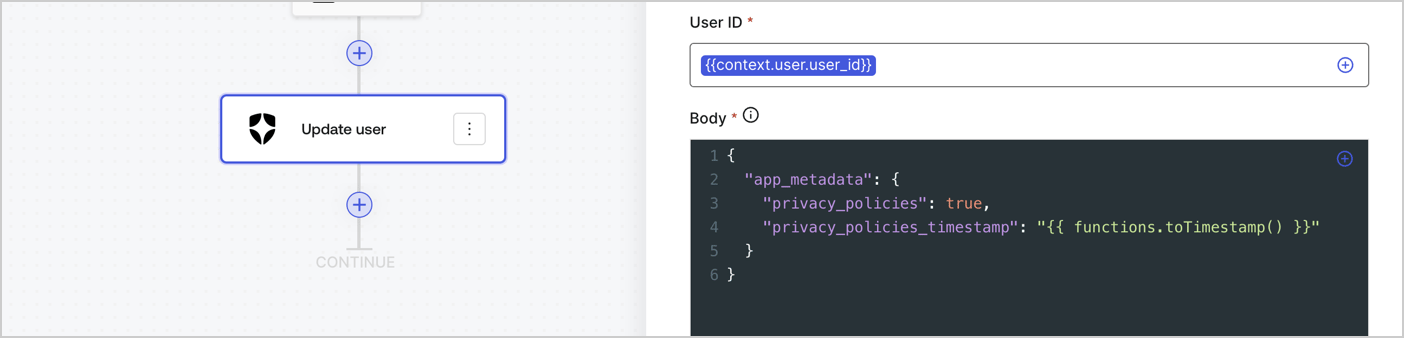
Ajoutez une action Auth0 **Update user** au flux en suivant les étapes ci-dessous :

1. Sélectionnez **Flow** **Update app\_metadata** > **Edit flow** pour ouvrir l’éditeur de flux dans un nouvel onglet.
2. Sous le StartAction, sélectionnez l’icône **+** pour ajouter une action **Update user**. Remplissez les champs ci-dessous, puis sélectionnez **Save** pour continuer.

   * **Connection** : Dans la liste déroulante, sélectionnez la connexion Vault de votre application M2M.

   * **User ID** : Entrez `{{context.user.user_id}}`.

   * **Body** : Copiez-collez le code suivant pour mettre à jour `app_metadata` avec les propriétés `privacy_policies` et `privacy_policies_timestamp`.

     ```text lines theme={null}
     {
       "app_metadata": {
         "privacy_policies": true,
         "privacy_policies_timestamp": "{{ functions.toTimestamp() }}"
       }
     }
     ```

   * Sélectionnez **Save**.
3. Sélectionnez **Publish** pour enregistrer.
<Frame>
  <img src="https://mintcdn.com/docs-staging-feat-sdk-reference-docs/FZw-B4H1_2E4nPXU/docs/images/cdy7uua7fh8z/CvMNIwWrOUwaFW4X3G28p/1fb70ae57a20749d9ffaaba8dc0b7e26/update-user-privacy.png?fit=max&auto=format&n=FZw-B4H1_2E4nPXU&q=85&s=85527dab074aefd6a6413a00358e0c4f" alt="Dashboard > Actions > Forms > User case privacy policy code" data-og-width="1404" width="1404" data-og-height="338" height="338" data-path="docs/images/cdy7uua7fh8z/CvMNIwWrOUwaFW4X3G28p/1fb70ae57a20749d9ffaaba8dc0b7e26/update-user-privacy.png" data-optimize="true" data-opv="3" srcset="https://mintcdn.com/docs-staging-feat-sdk-reference-docs/FZw-B4H1_2E4nPXU/docs/images/cdy7uua7fh8z/CvMNIwWrOUwaFW4X3G28p/1fb70ae57a20749d9ffaaba8dc0b7e26/update-user-privacy.png?w=280&fit=max&auto=format&n=FZw-B4H1_2E4nPXU&q=85&s=a280dad319818312204f04b9c06d153d 280w, https://mintcdn.com/docs-staging-feat-sdk-reference-docs/FZw-B4H1_2E4nPXU/docs/images/cdy7uua7fh8z/CvMNIwWrOUwaFW4X3G28p/1fb70ae57a20749d9ffaaba8dc0b7e26/update-user-privacy.png?w=560&fit=max&auto=format&n=FZw-B4H1_2E4nPXU&q=85&s=81ff389a0968a5d851f1bf97a7a5b594 560w, https://mintcdn.com/docs-staging-feat-sdk-reference-docs/FZw-B4H1_2E4nPXU/docs/images/cdy7uua7fh8z/CvMNIwWrOUwaFW4X3G28p/1fb70ae57a20749d9ffaaba8dc0b7e26/update-user-privacy.png?w=840&fit=max&auto=format&n=FZw-B4H1_2E4nPXU&q=85&s=aff33a779dfa71ff5f2d50255b20e95c 840w, https://mintcdn.com/docs-staging-feat-sdk-reference-docs/FZw-B4H1_2E4nPXU/docs/images/cdy7uua7fh8z/CvMNIwWrOUwaFW4X3G28p/1fb70ae57a20749d9ffaaba8dc0b7e26/update-user-privacy.png?w=1100&fit=max&auto=format&n=FZw-B4H1_2E4nPXU&q=85&s=5a65342e5e50d366637f2d49fb02a3c9 1100w, https://mintcdn.com/docs-staging-feat-sdk-reference-docs/FZw-B4H1_2E4nPXU/docs/images/cdy7uua7fh8z/CvMNIwWrOUwaFW4X3G28p/1fb70ae57a20749d9ffaaba8dc0b7e26/update-user-privacy.png?w=1650&fit=max&auto=format&n=FZw-B4H1_2E4nPXU&q=85&s=888b551b161a9b47bfccef8d8b94d494 1650w, https://mintcdn.com/docs-staging-feat-sdk-reference-docs/FZw-B4H1_2E4nPXU/docs/images/cdy7uua7fh8z/CvMNIwWrOUwaFW4X3G28p/1fb70ae57a20749d9ffaaba8dc0b7e26/update-user-privacy.png?w=2500&fit=max&auto=format&n=FZw-B4H1_2E4nPXU&q=85&s=9a325acd5c7d22bc5ea52b605955b644 2500w" />
</Frame>

<Callout icon="file-lines" color="#0EA5E9" iconType="regular">
  Le flux **Update app\_metadata** ajoute la valeur `privacy_policies true` à l’objet `app_metadata` et génère aussi un horodatage à l’aide d’une [fonction utilitaire.](/docs/fr-ca/customize/forms/variables)
</Callout>

<h2 id="retrieve-the-form-render-code">
  Récupérer le code de rendu du formulaire
</h2>

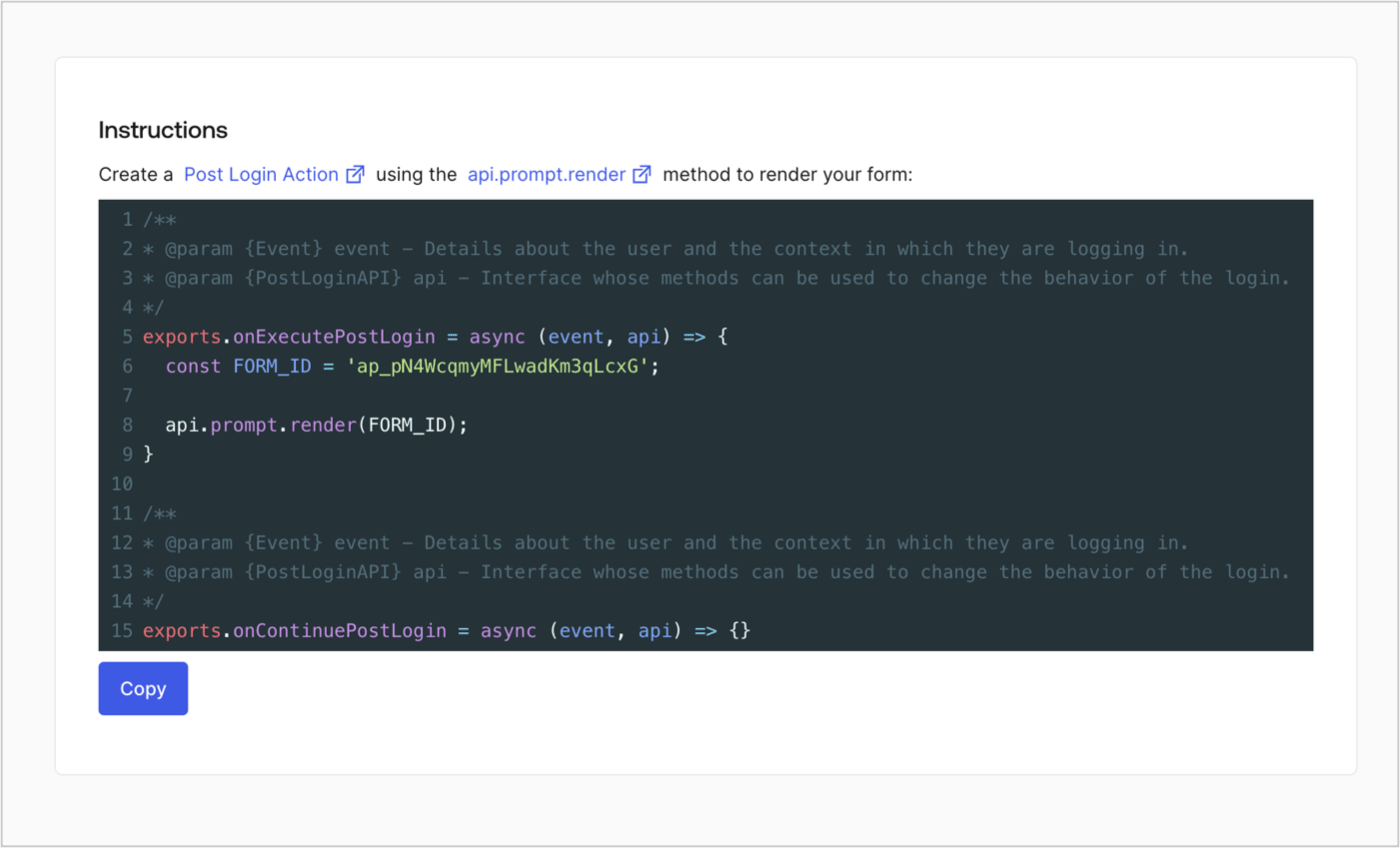
Récupérez le code de rendu de votre formulaire afin d’afficher le formulaire au moyen d’une Action Post Login personnalisée en suivant ces étapes :

* Dans l’éditeur de formulaires, sélectionnez **`<> Render`**.
* Sélectionnez **Copy**.
<Frame>
  <img src="https://mintcdn.com/docs-staging-feat-sdk-reference-docs/OMbaL5tGpZJgvr5N/docs/images/cdy7uua7fh8z/2EIUzc539sq9lwoTKbjoJv/496a864c0fc44a782c9cadca119dbfb0/embed.png?fit=max&auto=format&n=OMbaL5tGpZJgvr5N&q=85&s=c3f01a0a25be9003d924d1fd36528db5" alt="Dashboard > Actions > Forms > Form > Embed" data-og-width="1400" width="1400" data-og-height="848" height="848" data-path="docs/images/cdy7uua7fh8z/2EIUzc539sq9lwoTKbjoJv/496a864c0fc44a782c9cadca119dbfb0/embed.png" data-optimize="true" data-opv="3" srcset="https://mintcdn.com/docs-staging-feat-sdk-reference-docs/OMbaL5tGpZJgvr5N/docs/images/cdy7uua7fh8z/2EIUzc539sq9lwoTKbjoJv/496a864c0fc44a782c9cadca119dbfb0/embed.png?w=280&fit=max&auto=format&n=OMbaL5tGpZJgvr5N&q=85&s=7d74b1f31c6130dd37392e365d4a6ead 280w, https://mintcdn.com/docs-staging-feat-sdk-reference-docs/OMbaL5tGpZJgvr5N/docs/images/cdy7uua7fh8z/2EIUzc539sq9lwoTKbjoJv/496a864c0fc44a782c9cadca119dbfb0/embed.png?w=560&fit=max&auto=format&n=OMbaL5tGpZJgvr5N&q=85&s=4bd4e48eb66f5ccb1aee3fbefc4ca7f1 560w, https://mintcdn.com/docs-staging-feat-sdk-reference-docs/OMbaL5tGpZJgvr5N/docs/images/cdy7uua7fh8z/2EIUzc539sq9lwoTKbjoJv/496a864c0fc44a782c9cadca119dbfb0/embed.png?w=840&fit=max&auto=format&n=OMbaL5tGpZJgvr5N&q=85&s=94f7304ec285f277adac0f3fa554055f 840w, https://mintcdn.com/docs-staging-feat-sdk-reference-docs/OMbaL5tGpZJgvr5N/docs/images/cdy7uua7fh8z/2EIUzc539sq9lwoTKbjoJv/496a864c0fc44a782c9cadca119dbfb0/embed.png?w=1100&fit=max&auto=format&n=OMbaL5tGpZJgvr5N&q=85&s=5cd7a64e06c0ad06439f18770b9fc2f5 1100w, https://mintcdn.com/docs-staging-feat-sdk-reference-docs/OMbaL5tGpZJgvr5N/docs/images/cdy7uua7fh8z/2EIUzc539sq9lwoTKbjoJv/496a864c0fc44a782c9cadca119dbfb0/embed.png?w=1650&fit=max&auto=format&n=OMbaL5tGpZJgvr5N&q=85&s=ab8d06113203280105a4c67ff34ea3da 1650w, https://mintcdn.com/docs-staging-feat-sdk-reference-docs/OMbaL5tGpZJgvr5N/docs/images/cdy7uua7fh8z/2EIUzc539sq9lwoTKbjoJv/496a864c0fc44a782c9cadca119dbfb0/embed.png?w=2500&fit=max&auto=format&n=OMbaL5tGpZJgvr5N&q=85&s=1de46609e35d2171c7e768565d356ff3 2500w" />
</Frame>

<h2 id="create-a-post-login-action">
  Créer une Action Post Login
</h2>

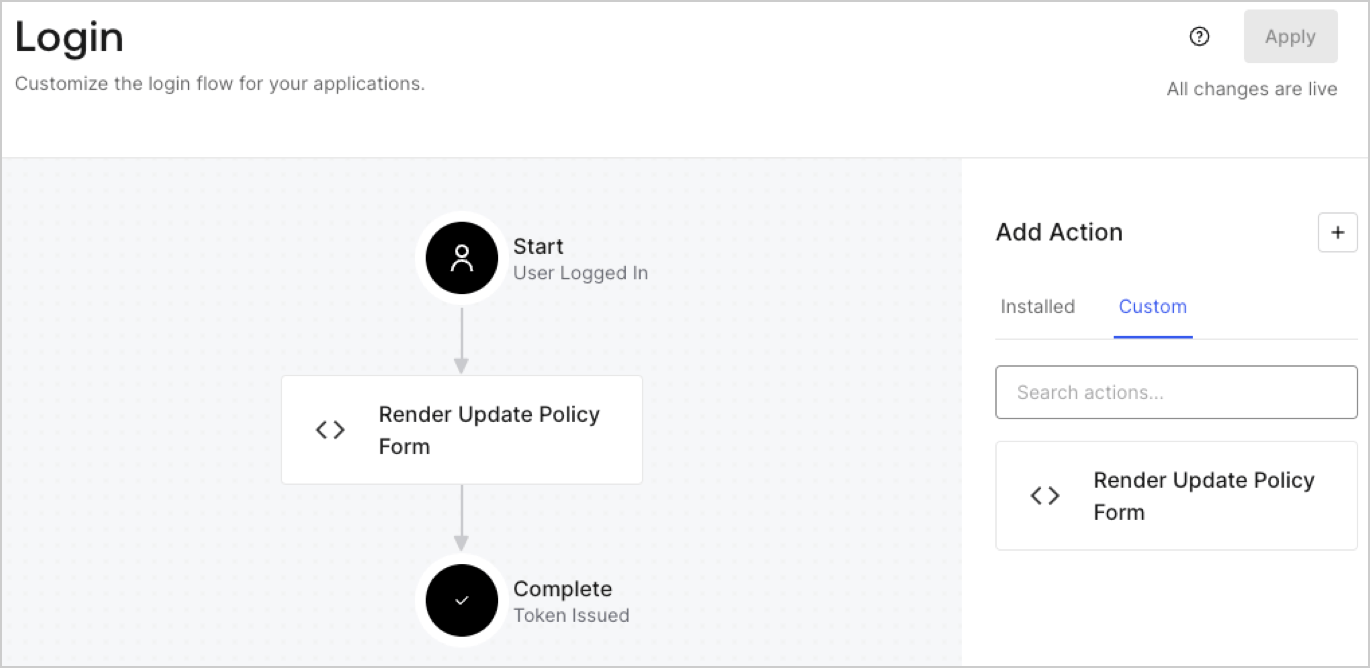
Créez une action post-login pour afficher votre formulaire en suivant les étapes ci-dessous :

1. Accédez à **Auth0 Dashboard > Actions > Flows > Login.**
2. Sélectionnez l’icône **+**, puis **Build from scratch** :

   * **Nom** : Entrez `Render Update Policy Form`.
   * **Déclencheur** : Sélectionnez `Login / Post Login`.
   * **Runtime** : Sélectionnez la version recommandée.
3. Sélectionnez **Créer**.

Pour configurer l’action post-login :

1. Supprimez le code existant dans l’éditeur de code.
2. Collez le code de rendu du formulaire dans l’éditeur de code.
3. Modifiez le code pour définir la logique conditionnelle qui affichera le formulaire.

   ```javascript lines theme={null}
   /**
   * @param {Event} event - Détails sur l’utilisateur et le contexte dans lequel il se connecte.
   * @param {PostLoginAPI} api - Interface dont les méthodes peuvent être utilisées pour modifier le comportement de la connexion.
   */
   exports.onExecutePostLogin = async (event, api) => {
     const FORM_ID = 'REPLACE_WITH_YOUR_FORM_ID';

     if (event.user.app_metadata.privacy_policies !== true) {
       api.prompt.render(FORM_ID);
     }
   }

   exports.onContinuePostLogin = async (event, api) => { }
   ```

   <Callout icon="file-lines" color="#0EA5E9" iconType="regular">
     L’exemple de code ci-dessus affichera le formulaire si la propriété `privacy_policies` est absente de l’objet app metadata de l’utilisateur.
   </Callout>
4. Sélectionnez **Déployer**.
5. Glissez-déposez l’Action **Render Update Policy Form** dans le flux de **Login**.
   <Frame>
     <img src="https://mintcdn.com/docs-staging-feat-sdk-reference-docs/VaWHC_KPGgUmZpWE/docs/images/cdy7uua7fh8z/5TOwDgevZsBqd7yZynUYWU/41ca909dc3007aed4f40ff794a05efa5/postlogin.png?fit=max&auto=format&n=VaWHC_KPGgUmZpWE&q=85&s=9e84dac4529ee9a29eb4e96fc3dff59f" alt="Dashboard > Forms > cas d’utilisation > action de connexion pour afficher le formulaire de mise à jour de la politique" data-og-width="1370" width="1370" data-og-height="668" height="668" data-path="docs/images/cdy7uua7fh8z/5TOwDgevZsBqd7yZynUYWU/41ca909dc3007aed4f40ff794a05efa5/postlogin.png" data-optimize="true" data-opv="3" srcset="https://mintcdn.com/docs-staging-feat-sdk-reference-docs/VaWHC_KPGgUmZpWE/docs/images/cdy7uua7fh8z/5TOwDgevZsBqd7yZynUYWU/41ca909dc3007aed4f40ff794a05efa5/postlogin.png?w=280&fit=max&auto=format&n=VaWHC_KPGgUmZpWE&q=85&s=7388ab0fdb82c0cb7851423ad7d29482 280w, https://mintcdn.com/docs-staging-feat-sdk-reference-docs/VaWHC_KPGgUmZpWE/docs/images/cdy7uua7fh8z/5TOwDgevZsBqd7yZynUYWU/41ca909dc3007aed4f40ff794a05efa5/postlogin.png?w=560&fit=max&auto=format&n=VaWHC_KPGgUmZpWE&q=85&s=a11ee7b29e127d91bba36afb4199e7cd 560w, https://mintcdn.com/docs-staging-feat-sdk-reference-docs/VaWHC_KPGgUmZpWE/docs/images/cdy7uua7fh8z/5TOwDgevZsBqd7yZynUYWU/41ca909dc3007aed4f40ff794a05efa5/postlogin.png?w=840&fit=max&auto=format&n=VaWHC_KPGgUmZpWE&q=85&s=f5e3fb4c95357ee5b57810dbd089e969 840w, https://mintcdn.com/docs-staging-feat-sdk-reference-docs/VaWHC_KPGgUmZpWE/docs/images/cdy7uua7fh8z/5TOwDgevZsBqd7yZynUYWU/41ca909dc3007aed4f40ff794a05efa5/postlogin.png?w=1100&fit=max&auto=format&n=VaWHC_KPGgUmZpWE&q=85&s=4facbcf30022e4e091c8b8609159366a 1100w, https://mintcdn.com/docs-staging-feat-sdk-reference-docs/VaWHC_KPGgUmZpWE/docs/images/cdy7uua7fh8z/5TOwDgevZsBqd7yZynUYWU/41ca909dc3007aed4f40ff794a05efa5/postlogin.png?w=1650&fit=max&auto=format&n=VaWHC_KPGgUmZpWE&q=85&s=b472cb7f4b13669dc7bba8aed774d3e2 1650w, https://mintcdn.com/docs-staging-feat-sdk-reference-docs/VaWHC_KPGgUmZpWE/docs/images/cdy7uua7fh8z/5TOwDgevZsBqd7yZynUYWU/41ca909dc3007aed4f40ff794a05efa5/postlogin.png?w=2500&fit=max&auto=format&n=VaWHC_KPGgUmZpWE&q=85&s=65a1155dd0469a0c1285d47595f2150b 2500w" />
   </Frame>
6. Sélectionnez **Appliquer**.

<h3 id="test-implementation">
  Test de la mise en œuvre
</h3>

Testez la mise en œuvre en suivant ces étapes :

1. Connectez-vous avec un utilisateur existant dont l’attribut app`_metadata` `privacy_policies` n’a aucune valeur.
2. L’Action post-login dans le flux de Login affichera le formulaire et demandera l’acceptation.
3. Sélectionnez **Auth0 Dashboard > User Management > Users,** repérez l’utilisateur et vérifiez que l’attribut `app_metadata` `privacy_policies` contient la valeur `true` ainsi qu’un horodatage.
