> ## Documentation Index
> Fetch the complete documentation index at: https://docs-staging-feat-sdk-reference-docs.mintlify.site/llms.txt
> Use this file to discover all available pages before exploring further.

> Learn how to configure your HTTP Vault Connections to authorize HTTP requests to external APIs or services.

# HTTP Vault Connection

## Configure your HTTP Vault Connection Options

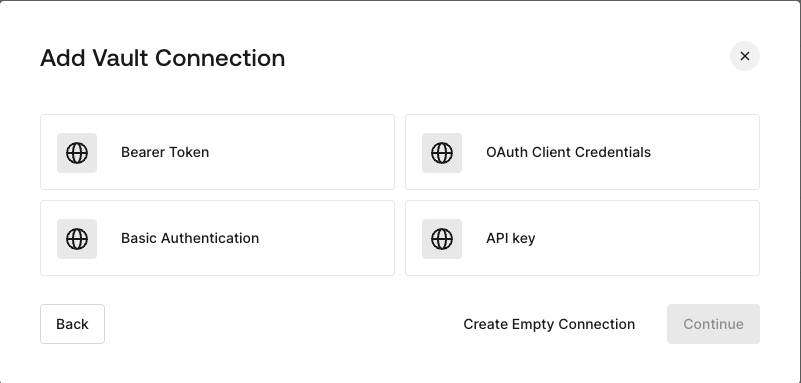
HTTP Vault Connection can be configure with different authentication options and then be used at your HTTP Request Flow Actions.
<Frame>
  <img src="https://mintcdn.com/docs-staging-feat-sdk-reference-docs/auJVn8-H-vaY8W-_/docs/images/customize/forms/vaults/http-vault-connection-options.png?fit=max&auto=format&n=auJVn8-H-vaY8W-_&q=85&s=acb47298c2104cd548aae4005378ba48" alt="Dashboard > Actions > Forms > Vault > HTTP" data-og-width="801" width="801" data-og-height="383" height="383" data-path="docs/images/customize/forms/vaults/http-vault-connection-options.png" data-optimize="true" data-opv="3" srcset="https://mintcdn.com/docs-staging-feat-sdk-reference-docs/auJVn8-H-vaY8W-_/docs/images/customize/forms/vaults/http-vault-connection-options.png?w=280&fit=max&auto=format&n=auJVn8-H-vaY8W-_&q=85&s=947a53a58b07dfdb6fd29f79444d71fe 280w, https://mintcdn.com/docs-staging-feat-sdk-reference-docs/auJVn8-H-vaY8W-_/docs/images/customize/forms/vaults/http-vault-connection-options.png?w=560&fit=max&auto=format&n=auJVn8-H-vaY8W-_&q=85&s=5b296b22c0a9bab402ea51316b226464 560w, https://mintcdn.com/docs-staging-feat-sdk-reference-docs/auJVn8-H-vaY8W-_/docs/images/customize/forms/vaults/http-vault-connection-options.png?w=840&fit=max&auto=format&n=auJVn8-H-vaY8W-_&q=85&s=a5a47de4d5bf4c80dabea13e32f3f896 840w, https://mintcdn.com/docs-staging-feat-sdk-reference-docs/auJVn8-H-vaY8W-_/docs/images/customize/forms/vaults/http-vault-connection-options.png?w=1100&fit=max&auto=format&n=auJVn8-H-vaY8W-_&q=85&s=a1ed78a30011ad2d4d40d7683688a731 1100w, https://mintcdn.com/docs-staging-feat-sdk-reference-docs/auJVn8-H-vaY8W-_/docs/images/customize/forms/vaults/http-vault-connection-options.png?w=1650&fit=max&auto=format&n=auJVn8-H-vaY8W-_&q=85&s=0f0ce652ae61afca35f523275e569f86 1650w, https://mintcdn.com/docs-staging-feat-sdk-reference-docs/auJVn8-H-vaY8W-_/docs/images/customize/forms/vaults/http-vault-connection-options.png?w=2500&fit=max&auto=format&n=auJVn8-H-vaY8W-_&q=85&s=88310d84e0ef88cb83d5def4af653cd7 2500w" />
</Frame>

## Configure your HTTP Vault Connection for Bearer Token

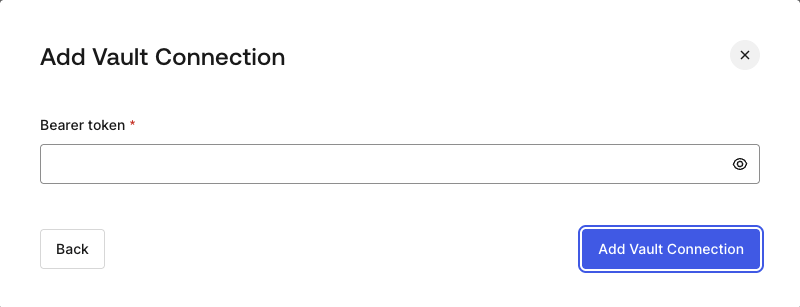
To configure a HTTP Vault Connection using **Bearer Token** authorization, you need to set the required parameters.
<Frame>
  <img src="https://mintcdn.com/docs-staging-feat-sdk-reference-docs/auJVn8-H-vaY8W-_/docs/images/customize/forms/vaults/http-vault-connection-bearer-token.png?fit=max&auto=format&n=auJVn8-H-vaY8W-_&q=85&s=a55357c01225f6b91d6c0c5715b73cc8" alt="Dashboard > Actions > Forms > Vault > HTTP" data-og-width="800" width="800" data-og-height="307" height="307" data-path="docs/images/customize/forms/vaults/http-vault-connection-bearer-token.png" data-optimize="true" data-opv="3" srcset="https://mintcdn.com/docs-staging-feat-sdk-reference-docs/auJVn8-H-vaY8W-_/docs/images/customize/forms/vaults/http-vault-connection-bearer-token.png?w=280&fit=max&auto=format&n=auJVn8-H-vaY8W-_&q=85&s=95f208ebdc2ae4eb8b25636b421cfa3c 280w, https://mintcdn.com/docs-staging-feat-sdk-reference-docs/auJVn8-H-vaY8W-_/docs/images/customize/forms/vaults/http-vault-connection-bearer-token.png?w=560&fit=max&auto=format&n=auJVn8-H-vaY8W-_&q=85&s=719337f3cb463ef390a8cb3c66937106 560w, https://mintcdn.com/docs-staging-feat-sdk-reference-docs/auJVn8-H-vaY8W-_/docs/images/customize/forms/vaults/http-vault-connection-bearer-token.png?w=840&fit=max&auto=format&n=auJVn8-H-vaY8W-_&q=85&s=76378cede3cfd800900d70aff91803a1 840w, https://mintcdn.com/docs-staging-feat-sdk-reference-docs/auJVn8-H-vaY8W-_/docs/images/customize/forms/vaults/http-vault-connection-bearer-token.png?w=1100&fit=max&auto=format&n=auJVn8-H-vaY8W-_&q=85&s=0c024a3145a035b07980fc62a5c647f2 1100w, https://mintcdn.com/docs-staging-feat-sdk-reference-docs/auJVn8-H-vaY8W-_/docs/images/customize/forms/vaults/http-vault-connection-bearer-token.png?w=1650&fit=max&auto=format&n=auJVn8-H-vaY8W-_&q=85&s=794cc0b669ac8f356150dcda59d19a77 1650w, https://mintcdn.com/docs-staging-feat-sdk-reference-docs/auJVn8-H-vaY8W-_/docs/images/customize/forms/vaults/http-vault-connection-bearer-token.png?w=2500&fit=max&auto=format&n=auJVn8-H-vaY8W-_&q=85&s=1d9613349ec0c7421d064c248fc126ff 2500w" />
</Frame>

### Input settings

| Parameter | Description |
| - | - |
| Bearer Token | Static token used for external service authorization. |

## Configure your HTTP Vault Connection for OAuth Client Credentials

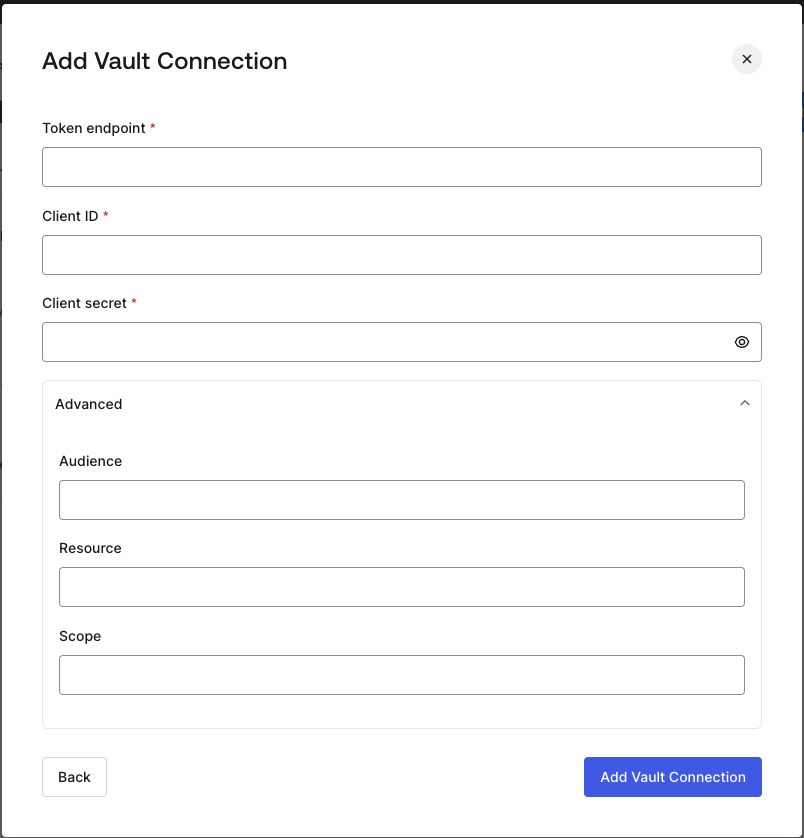
To configure a HTTP Vault Connection using **Client Credentials** authorization, you need to set the required parameters.
<Frame>
  <img src="https://mintcdn.com/docs-staging-feat-sdk-reference-docs/auJVn8-H-vaY8W-_/docs/images/customize/forms/vaults/http-vault-connection-oauth-client-credentials.png?fit=max&auto=format&n=auJVn8-H-vaY8W-_&q=85&s=68b6f5c11783d17e1a0fcc57ea08e93d" alt="Dashboard > Actions > Forms > Vault > HTTP " data-og-width="804" width="804" data-og-height="838" height="838" data-path="docs/images/customize/forms/vaults/http-vault-connection-oauth-client-credentials.png" data-optimize="true" data-opv="3" srcset="https://mintcdn.com/docs-staging-feat-sdk-reference-docs/auJVn8-H-vaY8W-_/docs/images/customize/forms/vaults/http-vault-connection-oauth-client-credentials.png?w=280&fit=max&auto=format&n=auJVn8-H-vaY8W-_&q=85&s=416ca629fd3f966c8803b2f9e8cbc435 280w, https://mintcdn.com/docs-staging-feat-sdk-reference-docs/auJVn8-H-vaY8W-_/docs/images/customize/forms/vaults/http-vault-connection-oauth-client-credentials.png?w=560&fit=max&auto=format&n=auJVn8-H-vaY8W-_&q=85&s=0ee5fc47a43d070cdb2c08ed0bb983c9 560w, https://mintcdn.com/docs-staging-feat-sdk-reference-docs/auJVn8-H-vaY8W-_/docs/images/customize/forms/vaults/http-vault-connection-oauth-client-credentials.png?w=840&fit=max&auto=format&n=auJVn8-H-vaY8W-_&q=85&s=0819ea20cf2a14662f90a48d51eeb309 840w, https://mintcdn.com/docs-staging-feat-sdk-reference-docs/auJVn8-H-vaY8W-_/docs/images/customize/forms/vaults/http-vault-connection-oauth-client-credentials.png?w=1100&fit=max&auto=format&n=auJVn8-H-vaY8W-_&q=85&s=4a399506737da69357453bde9e27006e 1100w, https://mintcdn.com/docs-staging-feat-sdk-reference-docs/auJVn8-H-vaY8W-_/docs/images/customize/forms/vaults/http-vault-connection-oauth-client-credentials.png?w=1650&fit=max&auto=format&n=auJVn8-H-vaY8W-_&q=85&s=1848dc3d7390e3c17174dcad109eda26 1650w, https://mintcdn.com/docs-staging-feat-sdk-reference-docs/auJVn8-H-vaY8W-_/docs/images/customize/forms/vaults/http-vault-connection-oauth-client-credentials.png?w=2500&fit=max&auto=format&n=auJVn8-H-vaY8W-_&q=85&s=3978b249a87a3025797880ae87ada36c 2500w" />
</Frame>

### Input settings

| Parameter | Description |
| - | - |
| Tenant Endpoint | Tenant Endpoint of the Authorization Server issuing the Access Tokens. |
| Client ID | Client ID of your M2M Application authorized for Custom API. |
| Client Secret | Client Secret of your M2M Application authorized for Custom API. |
| Audience (Optional) | Custom API Audience. Normally used for Custom APIs defined in Auth0. |
| Resource (Optional) | Custom API Resource. Standard parameter with similar meaning of Audience. |
| Scope (Optional) | Scope list in string format separated by spaces. |

## Configure your HTTP Vault Connection for API Key

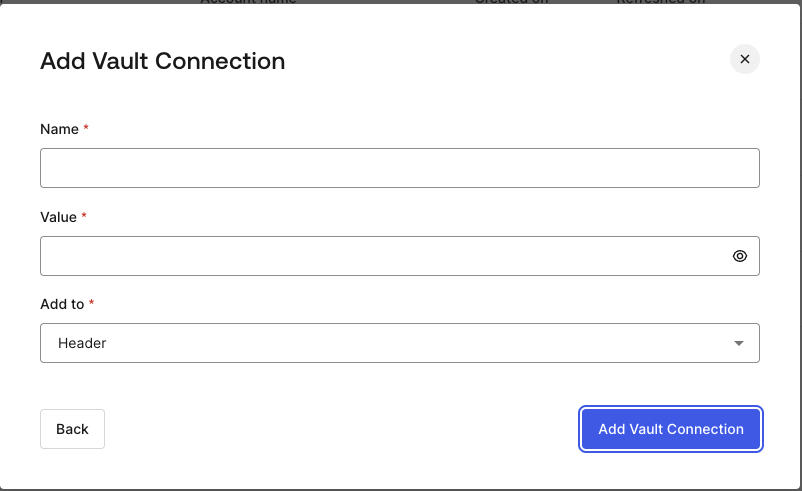
To configure a HTTP Vault Connection using **API Key** authorization, you need to set the required parameters.
<Frame>
  <img src="https://mintcdn.com/docs-staging-feat-sdk-reference-docs/auJVn8-H-vaY8W-_/docs/images/customize/forms/vaults/http-vault-connection-api-key.png?fit=max&auto=format&n=auJVn8-H-vaY8W-_&q=85&s=c26c70e8410dbbc55d281223b4317980" alt="Dashboard > Actions > Forms > Vault > HTTP " data-og-width="802" width="802" data-og-height="491" height="491" data-path="docs/images/customize/forms/vaults/http-vault-connection-api-key.png" data-optimize="true" data-opv="3" srcset="https://mintcdn.com/docs-staging-feat-sdk-reference-docs/auJVn8-H-vaY8W-_/docs/images/customize/forms/vaults/http-vault-connection-api-key.png?w=280&fit=max&auto=format&n=auJVn8-H-vaY8W-_&q=85&s=a60d41d41213ebdcfe2a96243525dc5d 280w, https://mintcdn.com/docs-staging-feat-sdk-reference-docs/auJVn8-H-vaY8W-_/docs/images/customize/forms/vaults/http-vault-connection-api-key.png?w=560&fit=max&auto=format&n=auJVn8-H-vaY8W-_&q=85&s=9e10bd18ac0cd8539f853d80a0073ecd 560w, https://mintcdn.com/docs-staging-feat-sdk-reference-docs/auJVn8-H-vaY8W-_/docs/images/customize/forms/vaults/http-vault-connection-api-key.png?w=840&fit=max&auto=format&n=auJVn8-H-vaY8W-_&q=85&s=b5ea604e1cc89026cd626d95c55bea9e 840w, https://mintcdn.com/docs-staging-feat-sdk-reference-docs/auJVn8-H-vaY8W-_/docs/images/customize/forms/vaults/http-vault-connection-api-key.png?w=1100&fit=max&auto=format&n=auJVn8-H-vaY8W-_&q=85&s=1699dc7664037f34a97fe3098317cfbd 1100w, https://mintcdn.com/docs-staging-feat-sdk-reference-docs/auJVn8-H-vaY8W-_/docs/images/customize/forms/vaults/http-vault-connection-api-key.png?w=1650&fit=max&auto=format&n=auJVn8-H-vaY8W-_&q=85&s=8b9cf28d7fc2b9b585e83aa0d49aadb1 1650w, https://mintcdn.com/docs-staging-feat-sdk-reference-docs/auJVn8-H-vaY8W-_/docs/images/customize/forms/vaults/http-vault-connection-api-key.png?w=2500&fit=max&auto=format&n=auJVn8-H-vaY8W-_&q=85&s=35b80e7c44975c21b50e03dc9314c7e3 2500w" />
</Frame>

### Input settings

| Parameter | Description |
| - | - |
| Name | API Key name to be added as Header or Query parameter. |
| Value | API Key value to be added as Header or Query parameter. |
| Add To | By default, it's Header. Determines whether to add the API Key as Header or Query parameter. |

## Configure your HTTP Vault Connection for Basic Authentication

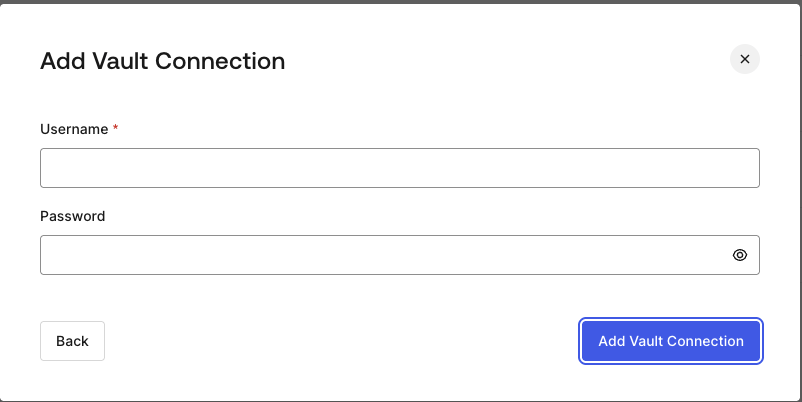
To configure a HTTP Vault Connection using **Basic Auth** authorization, you need to set the required parameters.
<Frame>
  <img src="https://mintcdn.com/docs-staging-feat-sdk-reference-docs/auJVn8-H-vaY8W-_/docs/images/customize/forms/vaults/http-vault-connection-basic-authentication.png?fit=max&auto=format&n=auJVn8-H-vaY8W-_&q=85&s=df50dda6a400b6aa0adbecc6e7e31886" alt="Dashboard > Actions > Forms > Vault > HTTP " data-og-width="802" width="802" data-og-height="402" height="402" data-path="docs/images/customize/forms/vaults/http-vault-connection-basic-authentication.png" data-optimize="true" data-opv="3" srcset="https://mintcdn.com/docs-staging-feat-sdk-reference-docs/auJVn8-H-vaY8W-_/docs/images/customize/forms/vaults/http-vault-connection-basic-authentication.png?w=280&fit=max&auto=format&n=auJVn8-H-vaY8W-_&q=85&s=e05490f4ddab9cca9c883c8fa5b3f215 280w, https://mintcdn.com/docs-staging-feat-sdk-reference-docs/auJVn8-H-vaY8W-_/docs/images/customize/forms/vaults/http-vault-connection-basic-authentication.png?w=560&fit=max&auto=format&n=auJVn8-H-vaY8W-_&q=85&s=47103b392b93efdc80d5db5eb52731b7 560w, https://mintcdn.com/docs-staging-feat-sdk-reference-docs/auJVn8-H-vaY8W-_/docs/images/customize/forms/vaults/http-vault-connection-basic-authentication.png?w=840&fit=max&auto=format&n=auJVn8-H-vaY8W-_&q=85&s=ce5d1805bf647c72182c39d57828b42c 840w, https://mintcdn.com/docs-staging-feat-sdk-reference-docs/auJVn8-H-vaY8W-_/docs/images/customize/forms/vaults/http-vault-connection-basic-authentication.png?w=1100&fit=max&auto=format&n=auJVn8-H-vaY8W-_&q=85&s=8c8095faee48d1c9d7eb57a9b0c9b0ca 1100w, https://mintcdn.com/docs-staging-feat-sdk-reference-docs/auJVn8-H-vaY8W-_/docs/images/customize/forms/vaults/http-vault-connection-basic-authentication.png?w=1650&fit=max&auto=format&n=auJVn8-H-vaY8W-_&q=85&s=ea7e290ff0a5f6c9278ec22e033da66b 1650w, https://mintcdn.com/docs-staging-feat-sdk-reference-docs/auJVn8-H-vaY8W-_/docs/images/customize/forms/vaults/http-vault-connection-basic-authentication.png?w=2500&fit=max&auto=format&n=auJVn8-H-vaY8W-_&q=85&s=c7424569b64822984f8cbef05aec50a2 2500w" />
</Frame>

### Input settings

| Parameter | Description |
| - | - |
| Username | Username to be concatenated and base64 encoded, then added as Basic Authorization Header parameter. |
| Password | Password to be concatenated and base64 encoded, then added as Basic Authorization Header parameter. |

<Warning>
  HTTP Vault Connection with Basic Auth configuration, is looking forward to replace the currently built-in option at Flows HTTP Request Action.
</Warning>
